Shopify
Overview
The Paxon ⸗ Active Ants Shopify Connector is built as a Shopify App. By installing the App a secure connection will be created between the Shopify shop and Maya. Products and orders will be synced from the Shop to our Maya system. Stock can be synced from Maya to the Shop, based on the Shopify location. Once an order is shipped we will mark the order as Fulfilled in Shopify and add labelcode, carrier-name and track&trace link to the order automatically. For products we use the SKU as a unique identifier and for orders we use the Shopify generated order number. The UPC codes are also exported to Maya, when new products are created.
Where can I find the App?
The Paxon ⸗ Active Ants App is available in the Shopify appstore.
What happens after installation?
- Paxon ⸗ Active Ants will ask for partner access after the url is shared with Paxon ⸗ Active Ants, just for checking some configurations.
- Checking product codes in relation to Shopify id;
- Bundles and variants
- Address details are set
- Order status etc.
After installation of the App, a script will start and import all products from Shopify into Maya. For each product (besides the SKU and UPC), the Shopify ID is also stored in Maya (field External ID). After the installation of the App:
- Existing and new products will be added to Maya, including updates.
- All orders with status = 'paid' and 'unfulfilled' will be added to Maya.
How do stock and order updates work in Shopify?
From MAYA a special task is programmed by a developer, which will send stock and order updates real-time to Shopify using the Shopify ID (External ID in MAYA).
Attention: If an order starts with __ (2 x an underline), no properties may be added to the orders, unless this is used for customization of an order line.
Attention: if SKU in Shopify is not identical to SKU in Maya, stock will not be synchronised.
Product bundles & Shopify
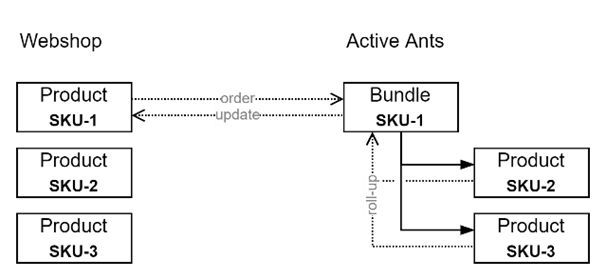
Paxon ⸗ Active Ants supports the configuration of product bundles, where one or more products can be combined under one SKU. The advantage is that your inventory can be flexibly used for both regular and bundled products. Paxon ⸗ Active Ants supports your bundle product as if it was a regular product and will handle orders for such products transparently.
Shopify does not support product bundles directly, but if you would like to configure product bundles, there are bundle apps available for Shopify. Through these Apps, product bundling functionality becomes available with additional benefits such as marketing, automatic price calculations, automatic display of discount percentages, etc.
If you want to use product bundles in combination with your Shopify webshop, there are two variants possible:
- Your webshop uses only bundle configuration in Maya and not in Shopify.
- Your shop uses both bundle configurations in Maya and in Shopify.
- Your webshop uses only bundle configurations in Shopify and not in Maya.
Variant 1: Bundles in Maya, not in Shopify
In this variant you have to enter the bundle products in Shopify in the same way as regular products. There is no difference between bundle products and regular products from Shopify's perspective.
How the bundle products should be configured in Maya, you can agree with your account manager. You indicate the SKU and which parts and quantities the bundle contains and Paxon ⸗ Active Ants will make sure it is configured correctly in Maya.
Paxon ⸗ Active Ants takes care of handling the product bundle by adding extra order lines internally for the bundled products so they are correctly included in the shipment. As soon as all bundled products have been shipped, Paxon ⸗ Active Ants will also communicate the status of the bundled product to Shopify.
There will be no communication about the bundled products between Shopify and Paxon ⸗ Active Ants.
Variant 2: Bundles in Maya as well as in Shopify
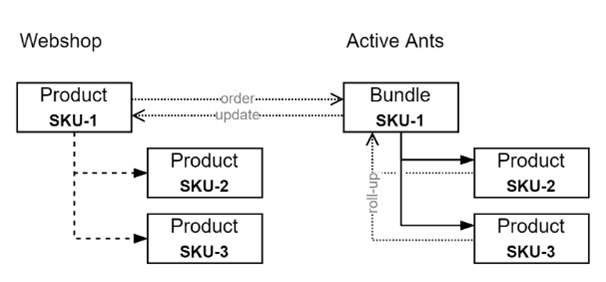
In this variant bundles are imported in Maya as well as in Shopify by means of a bundle app in Shopify. However, please note that the App does not split the product bundle and adds the bundled products as separate order lines to the order. Paxon ⸗ Active Ants will always add additional lines to the order internally for product bundles.
Some Bundle Apps in Shopify work well together and are easy to configure to avoid communication problems. Please see the 'Supported Shopify Bundle Apps' section for the Bundle Apps that are known to work well together. If you want to use a different Bundle App, please contact Paxon ⸗ Active Ants first to determine if this Bundle App is indeed suitable.
Variant 3: Bundles in Shopify, not in Maya
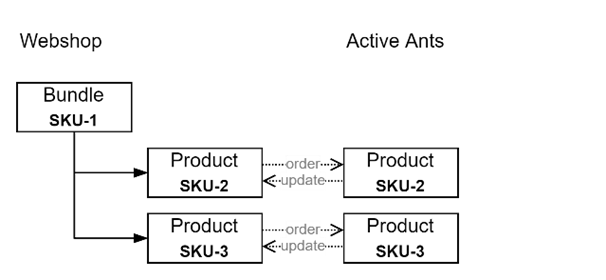
In this variant the product bundles are only configured in Shopify. Paxon ⸗ Active Ants is not aware of the bundles and will therefore create additional order lines internally for the bundled products of the product bundle.
This option offers the advantage that product bundles only need to be configured once. The functionality of Bundle App should then be sufficient such as calculating (virtual) stock of bundle products based on the stock of regular products.
If you want to configure product bundles in this way, the product bundles should not be ordered from Paxon ⸗ Active Ants. The reason for this is that the product bundles are not known to Paxon ⸗ Active Ants and therefore the shipment cannot be completed without intervention. Please see the 'Supported Shopify Bundle Apps' section for the Bundle Apps that are known to work well in this variant. If you would like to use another bundle app, please contact Paxon ⸗ Active Ants first to determine if this bundle app is indeed suitable.
Supported Shopify Bundle Apps
There are several Apps available in the Shopify App Store that can help you configure and manage product bundles. Some of these Bundle Apps are known to work well with Paxon ⸗ Active Ants. If you want to use an App that is not mentioned in this chapter, please contact us.
Simple Bundles & Kits - Freshly Commerce
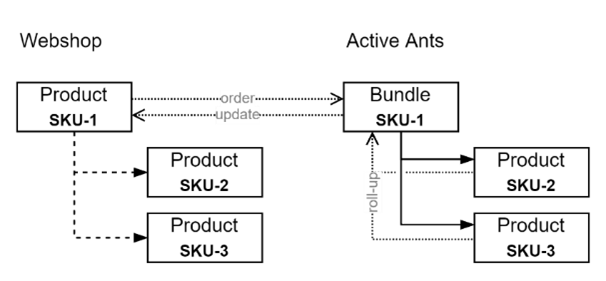
Works in variant 2 - bundles both in Maya and Shopify. The App 'Simple Bundles & Kits' from Freshly Commerce (https://apps.shopify.com/simple-bundles) can be configured to work together with Paxon ⸗ Active Ants product bundles. This App will only work properly if the product bundles are configured in Maya. The configuration in Maya includes the number of products bundled and a unique SKU for the bundle.
This App allows you to convert existing products in Shopify to bundles and link other products to them as bundled products. Please make sure that the bundle products or variants are given the correct SKUs and that they are marked as physical products.
Before accepting orders for product bundles, the App must be configured correctly:
- In 'Preferences' under the heading 'Fulfillment' the following settings must be made:
- Turn off 'Enable automatic fulfilment of bundle SKUs'.
- This setting prevents the product bundle from being signed off by the App. This is because Paxon ⸗ Active Ants will unsubscribe the product bundle when all bundled products have been shipped.
- Enable 'Enable automatic fulfilment of bundle contents'.
- This setting will ensure that the bundled products are unsubscribed by the App. Paxon ⸗ Active Ants will not communicate about the status of these bundled products. (Unless these products are ordered as a non-bundled product).
- You have the choice of 'Always fulfill all bundle contents' or 'Only fulfill bundle contents when parent bundle SKU is fulfilled'.
- The choice only determines when the App marks the bundled products as shipped; in other words, beforehand, or afterwards. The choice does not matter and is purely your preference.
- The setting for 'Request fulfilment for all order items' has no influence as far as Paxon ⸗ Active Ants is aware.
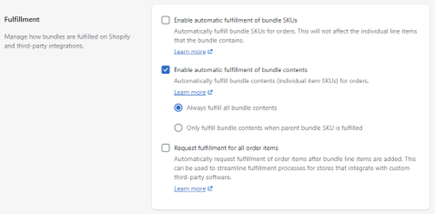
This App is only suitable for variant 2. It was investigated if this App also works with variant 3, where the bundles are only configured in Shopify. However, it turned out that this App does not work predictably in that case. The reason for this may lie in the selected payment methods in the checkout.
Advanced Bundle - Mageworx
Works with variant 3 - bundles in Shopify, not in Maya.
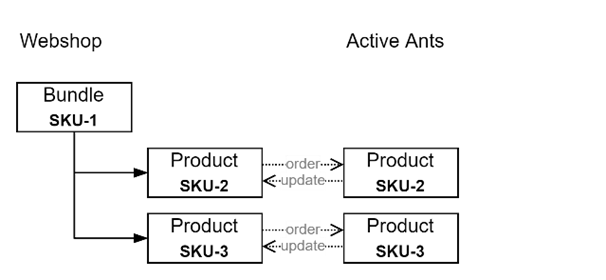
The Advanced Bundle Products app from Mageworx (https://apps.shopify.com/grouped-products) allows you to define product bundles in Shopify without having to configure an equivalent in Maya.
This App works because the bundle products are immediately put on 'fulfilled' and are actually never reported as 'to be shipped' to Paxon ⸗ Active Ants. Only the bundled products are ordered and signed off by Paxon ⸗ Active Ants once they have shipped.
Other bundle apps
If you would like to use another app which is not mentioned in this section, please contact us at itsupport@activeants.com for further coordination.
What's the customers' roadmap?
The customer loads the catalog with products in Shopify, each with its own name and SKU. An EAN/UPC is nice to have, but not necessary. For products with a variant it is important to create the ‘variants’ with a unique name and SKU. ‘Variants’ can be found within the main product and can be used for different sizes and colors of the products.
In the meantime, the account, order-type, packing slip(s) and BasketPic are setup by Paxon ⸗ Active Ants.
When the customer is done creating the catalog, Paxon ⸗ Active Ants will check if all fields are filled correctly. After that a go ahead is given and a start date is planned with account management and the customer.
On the day we go live, the customer must set all old orders on 'fulfilled' to prevent them being send to Paxon ⸗ Active Ants. Paxon ⸗ Active Ants will set tasks to confirm order status and to update the stock-levels.
Paid orders can be sent to us manually, by adding a random tag to the orders in bulk. Like this it's also possible to test with a test order.
After the connection is tested and working correctly, it is very important that the customer sets Shopify to "Do not Automatically fulfill orders".
Special considerations
- Multi-Language or multi-shop is not possible. For international Shopify shops it is recommended to set the main language to English to get the English product description on the packing slip.
- Do not change product codes (SKU) without first contacting your account manager at Paxon ⸗ Active Ants. They can determine whether this will have consequences for the stock and synchronization.
- With a tag, set by a Shopify Flow, a specific order-type can be given to an order. For specifications please ask Paxon ⸗ Active Ants.
- Special shipping options like pickup points or preferred date delivery are possible via a secondary app, the 'ActiveAnts Logistics module'. This app can be installed from the app store as well if you want to work with pickup points (currently available in NL, BE, DE, FR and the Scandinavian countries).
- The shipping methods in the Shopify shop are configured as well in Maya. Changes must be communicated with Paxon ⸗ Active Ants. If there’s a difference in configuration, Maya will choose the most appropriate shipping method.
- Connecting multiple Shopify shops to one stock/account at Paxon ⸗ Active Ants is possible. It is also possible to launch a shop per language/region while each shop has its own order-types and packing slips but shares stocklevels with other shops or systems.
- When the location ID is being used in Maya, and Maya is only allowed to receive orderslines from a specific location, Maya needs to be configured to do so, please inform Paxon ⸗ Active Ants if this is the case. (locationID as metafield in line_item
{"lineItemId":2254935621675, "locationId":14393114667, "quantity":1}). - Customization on order line level can be arranged by using the properties and values. Please advise Paxon ⸗ Active Ants in advance when you’re planning to use custom properties.
FAQ
How does the stock sync between Shopify and Maya work?
Paxon ⸗ Active Ants Shopify connection checks every few minutes if there has been a stock change in Maya. If this is the case the Maya stock will be transferred to Shopify, this is not done with a + or - action but by simply transferring the value to Shopify.
If you want to sell economic stock in Shopify you can check the box economic stock and create purchase orders in Maya. Then the products will get the numbers from the purchase orders added to the physical stock so you can continue to sell expected items.
Can I change a SKU?
No. Shopify has a separate ID for its SKUs. The SKU in Shopify has a separate ID. This ID is not linked with Maya but the SKU number. In Maya we link the SKU external ID to the sku number, through which the match can be found. If you change a SKU name, the link between Maya and the external ID is gone. This can therefore never be done without consulting Paxon ⸗ Active Ants.
Is the connection between Maya and Shopify case sensitive?
Yes, currently a sku with a capital difference will be seen as a separate SKU.
Can we use SKU variants?
Yes, Shopify doesn't actually work with SKUs but with product IDs. SKU is just an input field, just like barcode. There is no validation on that, which is why we always have to check before we go live that everything has a SKU.
I changed a SKU and now the item is not syncing with Maya.
Once a SKU is created from Shopify, it is also created in Maya. There is no Shopify ID attached to the SKU in Maya, so when the SKU is changed the identification is also gone and Maya will create a new SKU. Make sure at all times that when you change a SKU (number, not name) this needs to be checked in Maya.
Can I delete a SKU in Shopify?
If you delete a SKU in Shopify it will remain in Maya, because of the history. So always create new SKUs instead of reusing them. It is important to always consult itsupport@activeants.com.
Can I adjust bulk orders so that they are synchronised with AA?
Yes, you can. The most convenient way is to assign a tag in bulk.
Can I add an extra reference?
Yes, that is possible. If you add a reference in Shopify, this data will also be visible in Maya under Extra Reference. You have to take into account that this does not do anything without informing someone. If you want this reference on the packing note, then your Account Manager will have to realize this.