Shopware 6
The Paxon ⸗ Active Ants Shopware 6 Connector is built as a Shopware app. By installing the app, a secure connection is created between the Shopware 6 shop and Maya. Products, orders, stock, and Track & Trace information are synchronized automatically.
Products use the SKU as the unique identifier, and orders use the Shopware 6 order number.
Where can I find the app?
The Paxon ⸗ Active Ants App is hidden from the public Shopware 6 App Store.
Paxon ⸗ Active Ants provides a personalized installation link.
To generate this link, Paxon ⸗ Active Ants needs an API connection from the shop:
- Go to Settings
- Select System
- Go to Integrations
- Click Add Integration
- Name it Paxon ⸗ Active Ants Fulfilment
- Set the role to Administrator
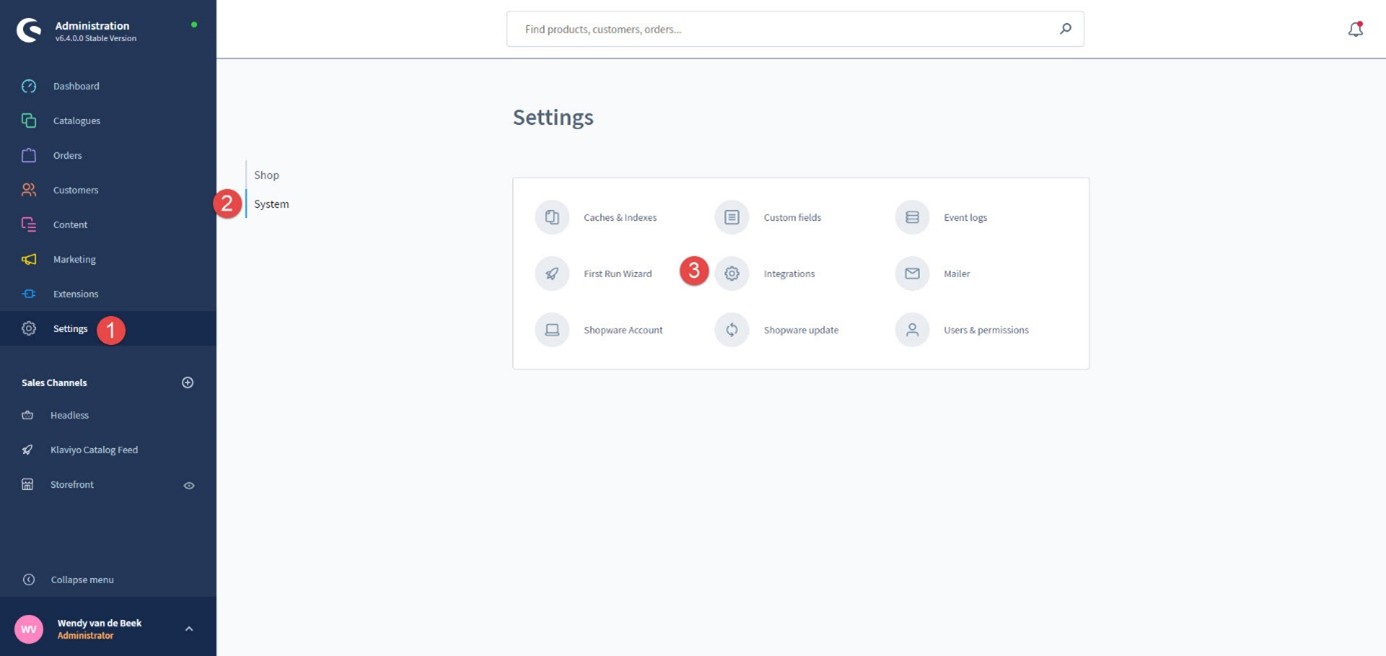
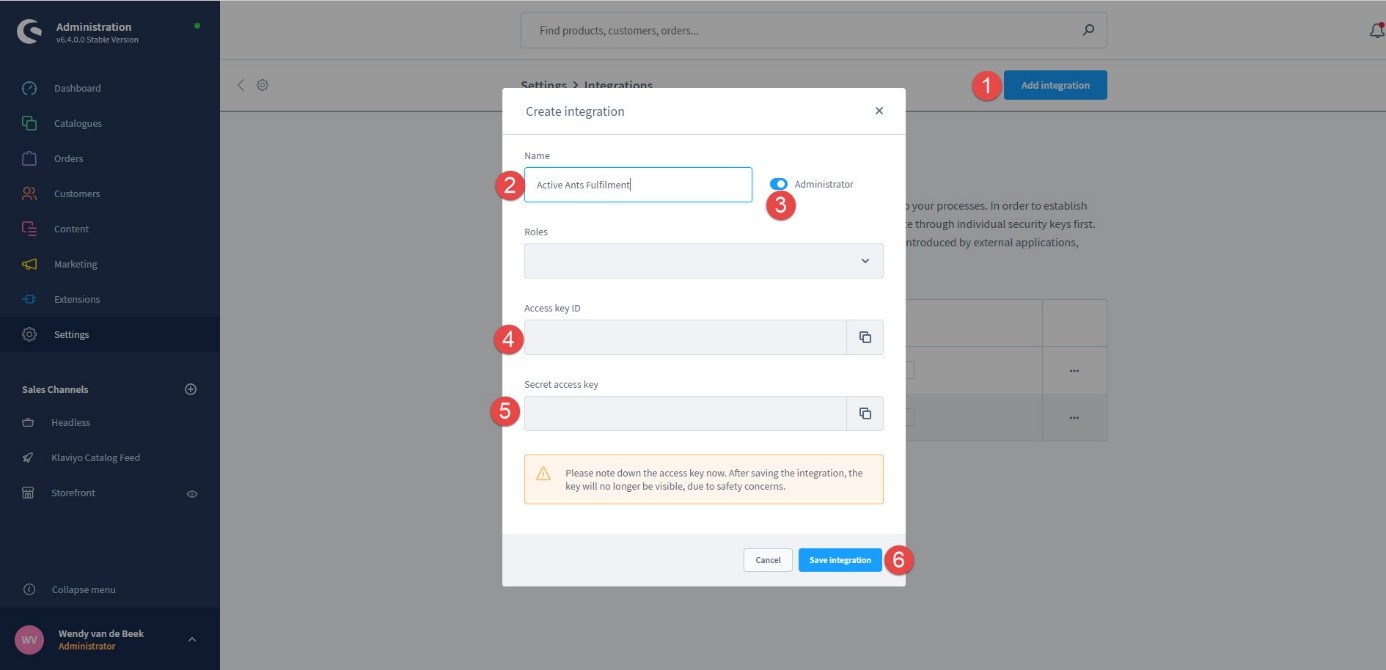
After creating the integration, provide Paxon ⸗ Active Ants with the Access Key ID and Secret Access Key.
What happens after installation?
Once the app is installed:
- A script imports all Shopware 6 products into Maya.
- For each product, the Shopware 6 ID is stored in Maya (field External ID).
- Existing and new products are added to Maya, including updates.
- All orders with status paid are forwarded to Maya.
How do stock and order updates work?
Maya runs a task that synchronizes:
- Stock levels
- Shipping status
This synchronization uses the Shopware 6 ID stored in Maya’s External ID field.
Special considerations
-
Multi-language and multi-shop are not supported.
Each Shopware 6 shop/language connects to one order type in Maya.
For international shops, set the main language to English so packing slips show English product descriptions. -
Do not copy products in Shopware 6 to create new ones.
Shopware immediately sends the copied product to Paxon ⸗ Active Ants, causing duplicates and stock sync issues. -
Customer types can be used to assign specific order types. Contact Paxon ⸗ Active Ants for details.
-
Special shipping options (pickup points, time delivery) are not possible.
No Dutch carriers support this via an app, and Shopware 6 does not allow checkout modifications. -
Shipping methods must be configured identically in both Shopware 6 and Maya.
If they differ, Maya will choose the most appropriate method.
Always inform Paxon ⸗ Active Ants of changes. -
Multiple Shopware 6 shops connected to one Paxon ⸗ Active Ants stock/account is only possible with custom software built by Paxon ⸗ Active Ants.
Shops per language/region are possible, each with its own order types and packing slips. -
If location ID is used in Maya and only specific locations may send order lines, Maya must be configured accordingly.
Example metafield:
{"lineItemId":2254935621675,"locationId":14393114667,"quantity":1} -
Customization at order-line level can be done using properties and values.
Inform Paxon ⸗ Active Ants beforehand if you plan to use custom properties.
Important final step
After the connection is tested and working correctly, the customer must set Shopware 6 to:
“Automatically fulfill orders”
This ensures orders receive the correct fulfilled status once Paxon ⸗ Active Ants ships them.